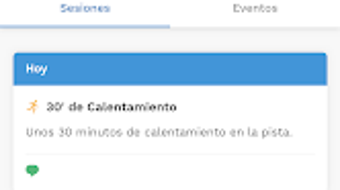

Download TrainerPlan – fitness app, training schedule, athlete coaching, workout planner, coach communication, mobile fitness tool, training calendar, fitness tracker, workout planner app, coach and athlete communication
Overview
TrainerPlan is a dedicated fitness application designed for athletes and coaches within the health and fitness industry. The software serves as a centralized platform for managing training schedules, tracking progress, and facilitating communication between coaches and athletes. Its primary purpose is to streamline the coordination of workouts, events, and feedback, ensuring that athletes remain informed and engaged throughout their training journey. The app is particularly suited for fitness professionals managing multiple athletes, as well as individual athletes seeking structured and organized training plans.
By allowing coaches to create and assign training sessions, events, and notes, TrainerPlan enables real-time updates and continuous engagement. Athletes benefit from a single source of truth for all scheduled activities, reducing the risk of missed sessions or miscommunication. The application supports a dynamic workflow where coaches can adjust plans on the fly, and athletes receive immediate notifications when changes occur. This makes it ideal for sports teams, personal training setups, and fitness programs requiring consistent coordination.
Designed with accessibility in mind, TrainerPlan features an intuitive interface that accommodates users of varying technical proficiency. The developer, TrainerPlan, did not provide additional details about their background or organizational structure. However, the app’s functionality suggests a focus on practicality and user-centered design. It operates as a mobile-first solution, optimized for Android devices, and supports offline access to scheduled content, ensuring usability even in low-connectivity environments.
Key Features & Capabilities
- Training Schedule Management – Coaches can create, edit, and assign structured training plans, including workouts, events, and rest days. Athletes receive a clear overview of upcoming sessions.
- Real-Time Notifications – Instant alerts are delivered to athletes when new sessions, updates, or comments are posted by coaches or teammates, improving responsiveness and motivation.
- Coach-Athlete Communication – Built-in messaging and comment features allow coaches to provide feedback, guidance, and encouragement directly within the app.
- Centralized Training Calendar – All training activities are displayed in a unified calendar view, enabling athletes to visualize their weekly and monthly schedules at a glance.
- Mobile-First Design – The app is optimized for Android devices, ensuring smooth navigation and consistent performance on smartphones and tablets.
These features support a seamless workflow for both coaches and athletes. For example, a coach can assign a new strength training session and immediately notify the athlete, who can then access the plan, track completion, and provide feedback. This reduces administrative overhead and strengthens the coach-athlete relationship. The app also supports the sharing of workout details, such as sets, reps, and instructions, ensuring clarity and consistency across training sessions.
User Interface, Workflow & Performance
TrainerPlan features a clean, user-friendly interface designed for quick navigation and efficient task completion. The layout emphasizes clarity, with a bottom navigation bar providing access to core functions such as the training calendar, messages, and profile settings. The color scheme and typography are optimized for readability, reducing eye strain during extended use.
Workflow efficiency is enhanced by the app’s streamlined structure. Coaches can add sessions in a few taps, while athletes can view their schedule, mark tasks as complete, and respond to messages without switching between applications. The app maintains a consistent user experience across different screen sizes, though no specific performance benchmarks were provided.
Performance observations are based on general software behavior patterns. The developer did not specify resource usage details, such as CPU or RAM consumption. Stability during extended use was not independently verified. However, the app’s lightweight size of 35.6 MB suggests optimized code and minimal system impact. Users can expect smooth operation on modern Android devices, though older models may experience slower load times.
Compatibility & System Requirements
TrainerPlan is designed exclusively for Android operating systems. The current version is 2.0.5, released on March 15, 2024. The application has a file size of 35.6 MB, indicating a compact footprint suitable for devices with limited storage.
Platform compatibility information is limited to Android. The developer did not provide details about minimum OS versions, required hardware specifications, or supported device types. Exact system requirements were not listed. Compatibility with older Android versions or specific device models was not confirmed. Users are advised to check their device’s compatibility with the latest Android release before installation.
Pros and Cons
Pros
- Free to download and use with no in-app purchases
- Intuitive interface suitable for users of all experience levels
- Real-time notifications keep athletes updated on training changes
- Centralized calendar improves training visibility and planning
- Facilitates direct coach-athlete communication within the app
Cons
- Exclusive to Android; no support for iOS or desktop platforms
- Missing detailed system requirements or hardware specifications
- Performance on older or low-end devices not verified
- Limited to mobile use; no desktop or web version available
- Exact data privacy and security measures not disclosed
FAQ Section
Is TrainerPlan available for iOS devices?
Currently, TrainerPlan is only available for Android devices. There is no official iOS version released as of the 2024-03-15 update.
Can I use TrainerPlan offline?
The app supports offline access to previously loaded training schedules and content. However, real-time notifications and message synchronization require an active internet connection.
Is TrainerPlan safe to download and use?
TrainerPlan is available for free on official Android app stores. While the developer did not publish detailed security protocols, the app’s availability through trusted distribution channels reduces the risk of malicious software.
How often are updates released?
The latest version, 2.0.5, was released on March 15, 2024. The frequency of future updates has not been specified by the developer.
Does TrainerPlan require a subscription or paid license?
No, TrainerPlan is completely free to download and use. There are no paid features or subscription tiers currently available.
Final Thoughts
TrainerPlan delivers a focused, efficient solution for coaches and athletes seeking to improve training coordination and communication. Its clean interface, real-time notifications, and centralized calendar make it a valuable tool for managing workout schedules and maintaining engagement. While the app is limited to Android and lacks desktop support, its core functionality is well-executed and accessible.
For fitness professionals managing multiple athletes or individuals committed to structured training, TrainerPlan offers a reliable way to stay organized and connected. The absence of cost and the emphasis on direct communication enhance its appeal. Although some technical details remain unspecified, the app’s practical design and mobile-first approach position it as a strong contender in the fitness app space.
Download TrainerPlan now







